Why “low-cost digitalisation” matters more in 2026 than ever
In 2026, “digitalisation” is no longer a big-bang transformation project reserved for the largest fleets. The winning approach is now small, practical, low-risk changes that compound—especially when margins are tight, crews are stretched, and operational complexity keeps rising.
The biggest shift enabling this? Affordable, high-performance connectivity and cloud tooling are now reaching vessels at scale. For example, Maersk announced a Starlink rollout across 330+ owned/operated container vessels (with reported speeds over 200 Mbps) to support crew connectivity and expand cloud-enabled vessel operations. And Starlink’s own 2024 progress reporting has been widely cited as indicating 75,000+ vessels connected, showing how quickly LEO connectivity is expanding across maritime.
But here’s the key: connectivity alone doesn’t improve operations. The operational gains come from what you do because connectivity exists—digitising repeat workflows, capturing better data, and building decision support that removes delays and confusion.
This blog focuses on exactly that: low-cost strategies that:
don’t require major shipyard time,
don’t depend on large IT teams,
and can be rolled out vessel-by-vessel without disrupting operations.
What “low-cost” means in a shipping context (a useful definition)
Low-cost digitalisation is not “cheap software.” It’s a strategy that meets four tests:
Minimal hardware: use smartphones/tablets/PCs already onboard; add only small bolt-on devices if needed.
Fast deployment: results in 30–90 days, not 12–18 months.
Direct operational KPI impact: fewer delays, fewer repeated calls, faster decision-making, less paperwork time.
Works with real ship constraints: limited bandwidth, shift work, mixed digital skills, and imperfect data.
The easiest way to structure it is to build bottom-up.
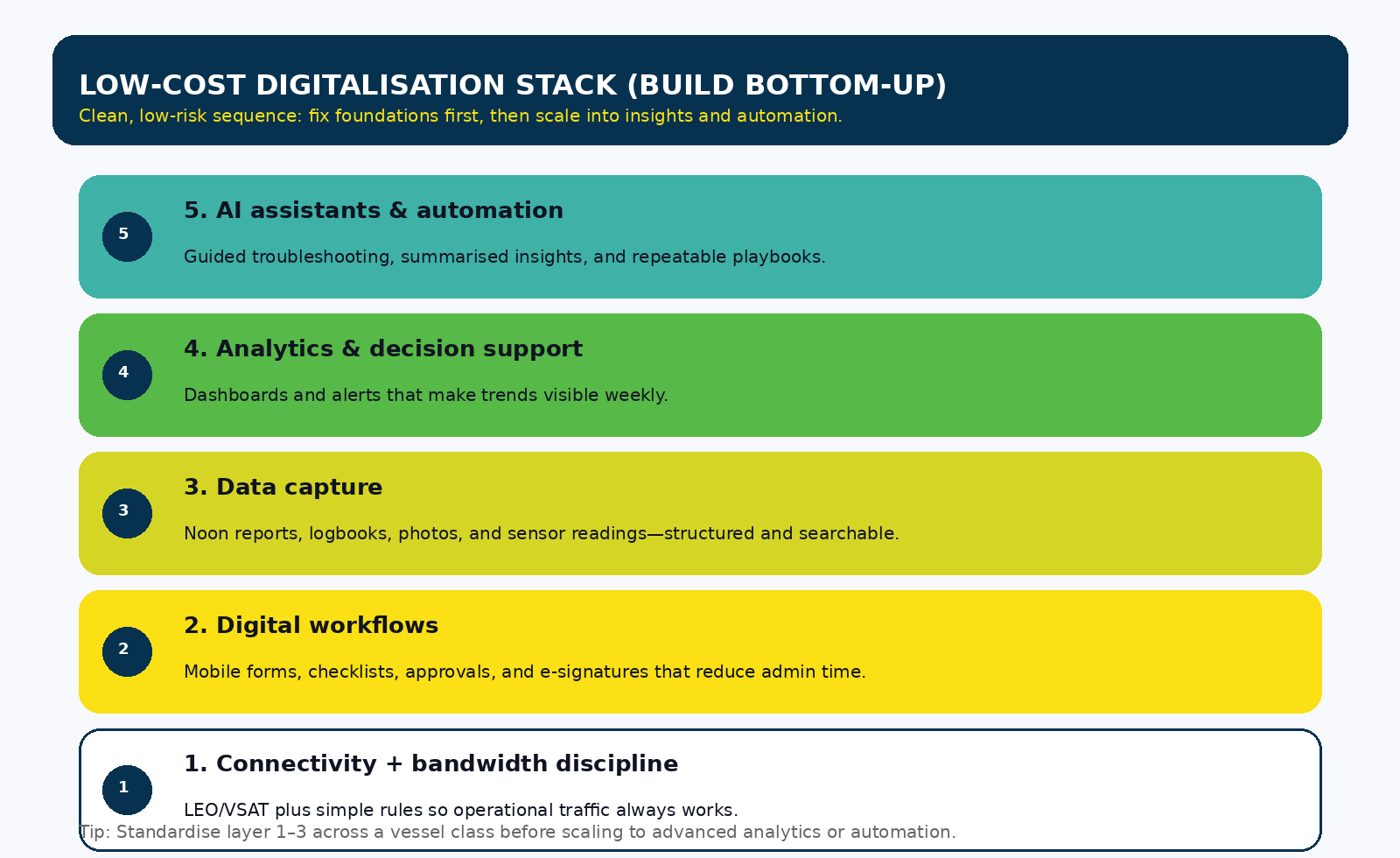
The low-cost digitalisation stack (the order that prevents wasted spending)
Most fleets waste money by starting at the top (“AI”, “advanced analytics”) while the foundation is missing. The more reliable order is:
Connectivity + bandwidth discipline
Digital workflows (forms, checklists, handovers)
Data capture (noon, maintenance rounds, spares)
Analytics (simple dashboards + alerts)
Automation / AI assistance (guided steps, faster answers)
If you build in this order, each layer makes the next one cheaper.
10 low-cost digitalisation strategies that work in 2026
1) Low Earth Orbit (LEO) connectivity + a simple bandwidth policy (the “starter motor” strategy)
What it is: Upgrade connectivity (often Low Earth Orbit (LEO) + existing VSAT) and add a basic onboard bandwidth policy: business traffic first, welfare traffic managed, software updates scheduled.
Why it’s low-cost: You’re not redesigning systems. You’re enabling everything else to run reliably.
Live use case: Maersk’s rollout described Starlink enabling better crew connectivity and supporting cloud-based applications onboard. Maersk Starlink’s reported scale (75,000+ vessels connected) indicates pricing and availability have moved into “mass adoption” territory.
How to implement in 30 days
Create two network lanes: (1) ship operations, (2) crew welfare
Schedule updates (charts, OS updates, ERP sync) to off-peak windows
Add a simple monthly review: top apps by usage + any recurring congestion periods
Standardise: same router config template across vessels
KPIs to track
“Time to get shore response” for technical queries
Number of video calls successfully used for troubleshooting support
Reduction in “email back-and-forth” cycles
2) Mobile-first digital checklists and forms (your fastest productivity win)
What it is: Replace paper checklists and free-text emails with mobile forms for:
daily rounds,
toolbox talks,
planned maintenance confirmations,
engine-room logs (where appropriate),
port-call readiness checks.
Why it works: Paper creates three hidden costs—rewriting, re-explaining, and re-finding. A structured digital form turns “tribal knowledge” into consistent operational data.
Low-cost tooling options (typical)
Microsoft 365 forms/workflows
Google forms + approvals
Simple inspection apps (vessel-by-vessel rollout)
Implementation tips
Start with 2–3 high-frequency workflows only (don’t digitise everything at once)
Keep forms short: checkboxes, photo upload, one “notes” field
Make it usable offline and sync when network returns
KPIs
Time spent preparing reports
Missing/late submissions
Repeated defects caused by incomplete handovers
3) Offline digital library + QR codes (make information “findable” in 10 seconds)
What it is: A ship-specific offline library (manuals, drawings, maker docs, past defect notes) indexed by equipment. QR labels on equipment open the right page or folder immediately.
Why it’s low-cost: No new sensors needed—this is purely workflow and information design.
Create QR labels for top 50 “most-referenced” equipment items
Include: manuals, quick-start troubleshooting, last 10 recurring issues, spares list
Operational impact
Faster diagnosis because engineers stop hunting across PDFs and email chains
Better continuity across crew changes
KPI
Average time to locate the correct procedure/document
Repeat questions asked to shore support
4) Remote expert support using phone video + structured evidence packs
What it is: Turn ad-hoc calls into a repeatable “remote assist” process:
video walkthrough + photos,
structured checklist of evidence,
short fault description template,
log capture.
Live use case: DNV describes remote surveys reducing waiting time and travel costs by enabling surveys to be conducted remotely with onboard crew acting as camera operators. DNV also reported 15,000 remote surveys and inspections completed since the service launch (Oct 2018), highlighting operational maturity and adoption.
Why it’s low-cost: You already have the cameras. The cost is mostly training + standardisation.
How to implement
Create a “remote assist kit”: head torch, phone mount, simple checklist
Define “evidence packs” by alarm type (lube oil pressure low, jacket water temp high, etc.)
Store evidence into a shared folder per case (searchable later)
KPIs
First-time resolution rate of remote support sessions
What it is: Use weather routing / voyage optimisation tools and shore support to improve route, speed plan, and timing.
Why it’s low-cost: You don’t need new hardware—most of the spend is subscription + operational adoption.
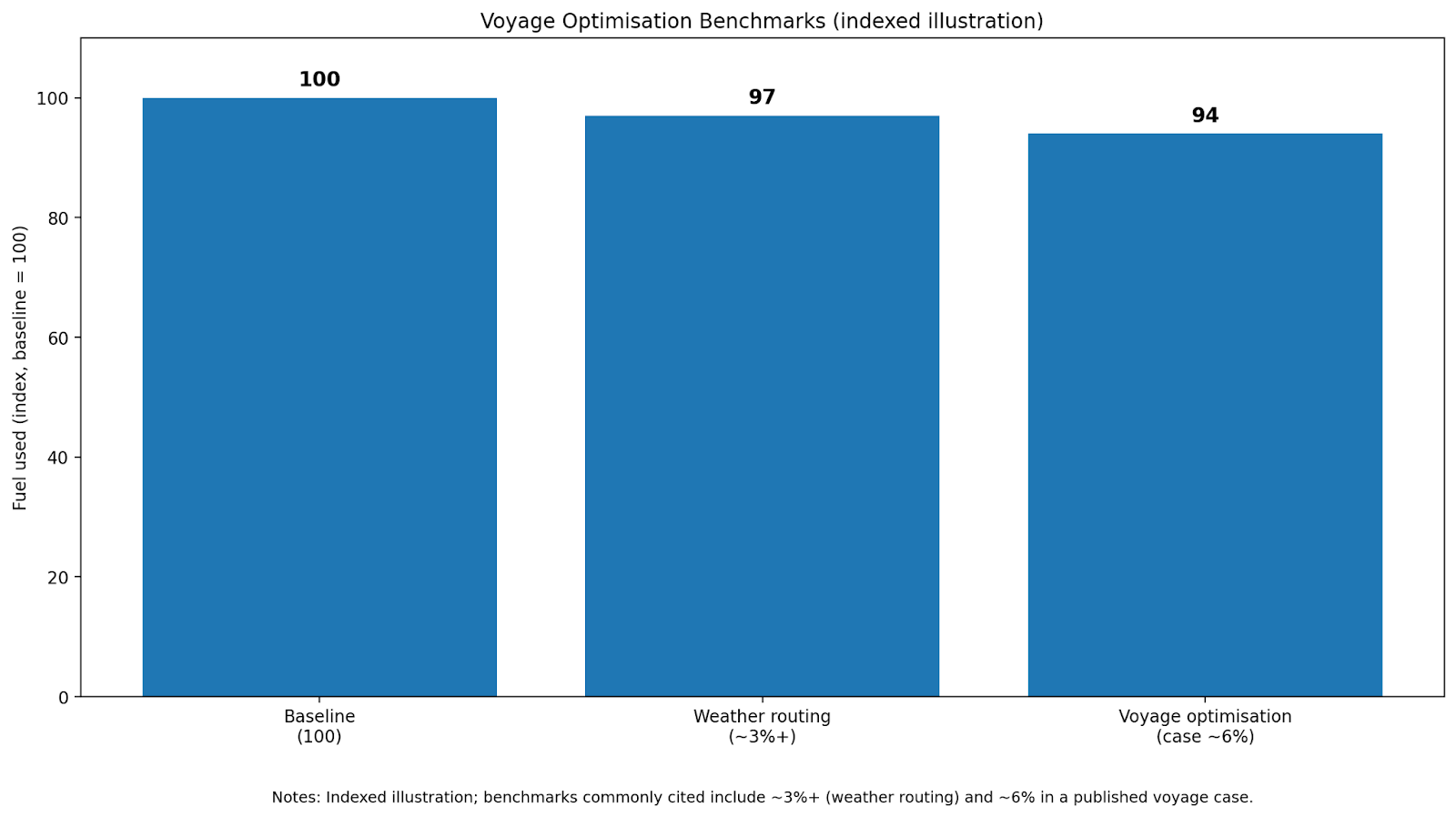
Live use case + data: A StormGeo example (Panama Canal → Japan tanker voyage) reported savings of ~550 nautical miles, ~42 hours, and ~6% fuel consumption when the vessel followed an optimised routing recommendation. StormGeo also cites an IMO-stated benchmark that weather routing saves at least ~3% fuel consumption (often more depending on vessel/route).
How to implement
Start with 10–20 voyages on 1–2 vessels
Track: planned vs actual route, speed profile, fuel used, and delays
6) “Tiny sensor” retrofit for condition monitoring (start with vibration + temperature)
What it is: Add a small set of sensors (vibration/temp/current clamps) to your top failure-causing equipment:
pumps,
purifiers,
fans,
compressors,
bearings,
critical motors.
Why it’s low-cost: You’re not building a full digital twin. You’re instrumenting only the equipment where early warning pays back fast.
How to start
Pick 5–10 assets that historically create the most disruption
Pilot one vessel for 60–90 days
Use simple thresholds first (e.g., rising vibration trend) before advanced models
KPIs
Early warnings caught vs failures
Unplanned maintenance events reduced
Spares ordered “in time” instead of urgent procurement
7) Lightweight maintenance planning + barcode spares (cut the chaos in stores)
What it is: If your spares process is still spreadsheet-heavy, you can modernise without a major ERP project:
barcode labels for bins and critical spares,
scanning into a lightweight inventory tool,
link spares usage to maintenance jobs.
Why it works: Stores problems don’t show up as “IT issues”—they show up as delays and last-minute purchases.
Quick-win approach
Label top 200 high-turn spares + critical long-lead items
Create a simple “issue/receive” scan workflow
Weekly audit: top missing items + stockout risk list
KPIs
Stockout events
Emergency courier shipments
Time spent searching stores
8) Digital handovers + micro-learning (reduce knowledge loss during crew changes)
What it is: Standardise:
watch handover notes (structured),
recurring defect summaries,
short micro-learning modules for common equipment/alarm types.
Why it’s low-cost: You can do it with a shared drive + simple templates + short video clips.
Implementation tips
Build “Top 20 recurring issues” library per vessel class
Make each module <5 minutes
Store it offline onboard and sync updates monthly
KPIs
Repeat incidents after crew change
Time-to-stabilise after joining
Reduction in “where is that procedure?” queries
9) Paperless documentation where it gives immediate speed: eBL and document workflows
What it is: Digitise the document exchange steps that cause delays—especially Bills of Lading and supporting documents.
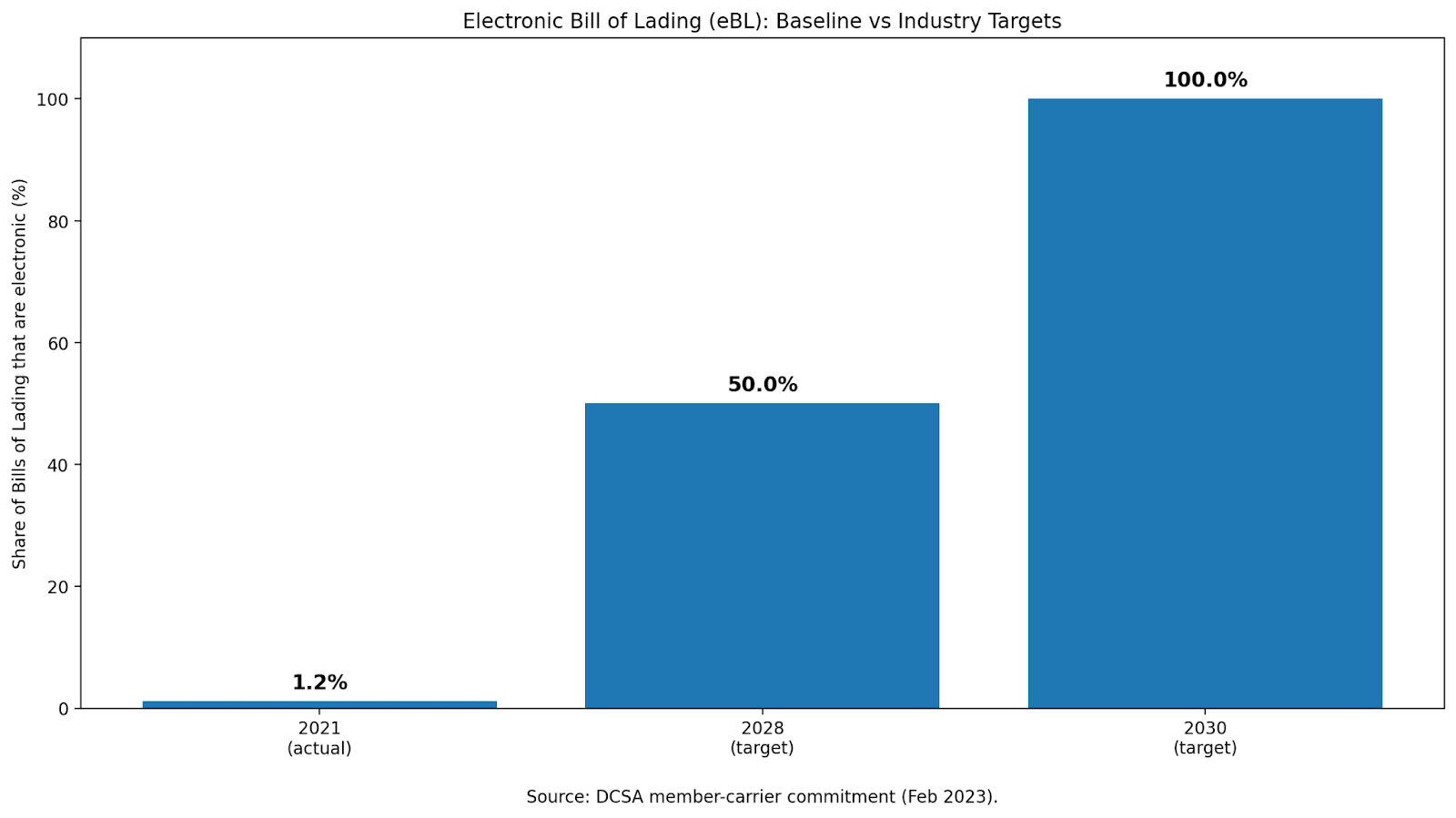
Live industry data: DCSA reported ocean carriers issue ~45 million bills of lading per year, and in 2021 only ~1.2% were electronic; member carriers committed to move to 50% digital within five years and 100% by 2030. DCSA also cited potential benefits including $6.5B in direct cost savings and $30–40B annual global trade growth enabled by moving away from paper processes. MSC noted eBLs can be transmitted “in minutes” versus “days or weeks,” improving speed and reducing admin burden.
Low-cost starting point
You don’t need “everything paperless.” Start with:
one trade lane,
one customer group,
one set of document types.
Standardise templates and approvals first; then digitise exchange.
KPIs
Document cycle time
Number of document re-issues
Delays caused by missing paperwork
10) Low-code dashboards for operational KPIs (make performance visible weekly)
What it is: A simple dashboard that pulls from forms/logs and shows:
recurring alarms/issues (top 10),
maintenance backlog,
stores stockout risk,
voyage fuel performance indicators,
response times (ship↔shore support).
Why it’s low-cost: It’s not a “data lake” project. It’s a leadership visibility tool.
Implementation
Start with manual upload weekly if integrations take time
Add automation later once the dashboard proves value
Keep the dashboard limited to 12–15 metrics (or nobody uses it)
KPIs
Weekly trend improvements
Reduction in recurring issues
Faster decision-making cadence
A practical comparison table: cost, time, and what you get
Use this as a leadership-level “menu” when planning budgets.
Strategy
Typical upfront cost level
Time to deploy
What improves first
Best first KPI
LEO connectivity + bandwidth policy
Low–Medium
2–6 weeks
Faster support + smoother tools
Remote support success rate
Mobile forms & checklists
Low
2–4 weeks
Less paperwork time
Late/missing reports
Offline manuals + QR
Low
2–6 weeks
Faster troubleshooting
Time to find procedure
Remote video support playbook
Low
2–4 weeks
Faster fixes
Repeat calls per issue
Voyage optimisation / routing
Medium
4–8 weeks
Fuel + schedule stability
Fuel per NM (normalised)
Retrofit sensors (small pilot)
Medium
6–12 weeks
Early warning
Failures prevented
Lightweight stores + barcode
Low–Medium
4–10 weeks
Fewer delays
Stockout events
Digital handovers + micro-learning
Low
2–6 weeks
Less knowledge loss
Repeat issues post crew change
eBL/document workflow
Medium
8–16 weeks
Faster document cycle
Cycle time / re-issues
Low-code dashboards
Low
2–6 weeks
Leadership visibility
Weekly trend movement
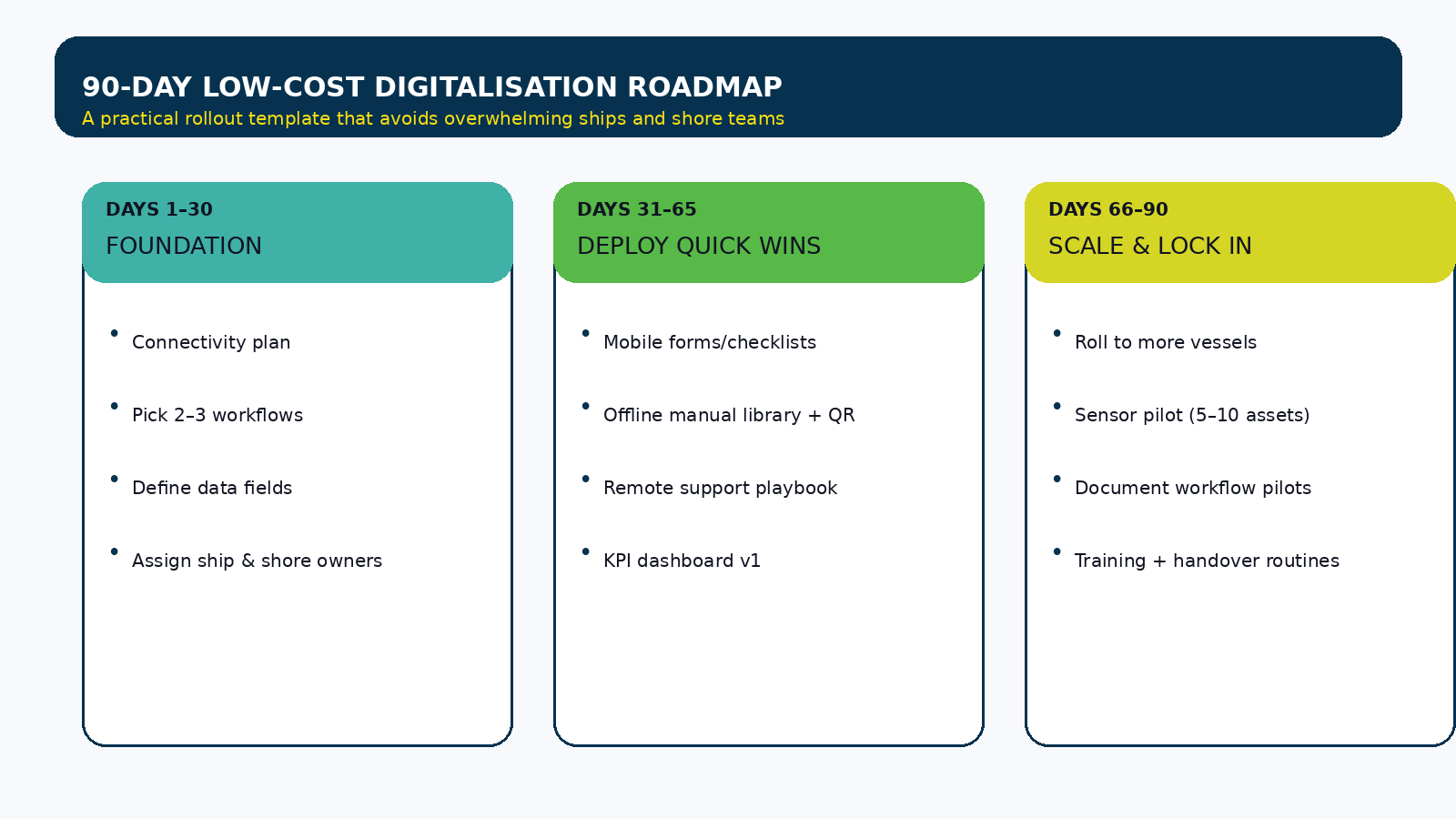
The 90-day rollout plan (what successful fleets actually do)
Here’s a realistic template you can run without overwhelming the organisation.
Days 1–30: Foundation
Pick 2–3 workflows to digitise first (high frequency, high pain)
Define data fields (standard naming prevents messy dashboards later)
Choose ship & shore champions (don’t outsource ownership)
Agree basic connectivity rules and update schedules
Days 31–65: Deploy quick wins
Roll out mobile forms/checklists on 1–2 vessels
Build offline manual library + QR for top equipment
Launch remote support evidence packs for 3 common alarm types
Build dashboard v1 (even if updated weekly)
Days 66–90: Scale and lock it in
Roll to more vessels
Start a small sensor pilot (5–10 assets)
Expand document workflows (one lane/customer set)
Train: handovers + short learning modules for recurring issues
What to watch out for (so “low-cost” doesn’t become “low adoption”)
Low-cost projects fail for predictable reasons. Avoid these:
Digitising broken processes Fix the workflow first—then digitise.
Too many forms too soon Start with 2–3. Make them excellent. Expand later.
No single owner Every strategy needs an owner with weekly accountability.
Data fields that aren’t standard If one ship logs “ME LO Press Low” and another logs “Main engine low lube pressure,” your dashboard becomes useless.
No feedback loop onboard Crews adopt faster when they see benefits (fewer repeated questions, faster responses, less admin).
Where SmartSeas.AI fits (optional but highly aligned with low-cost strategy #3 and #10)
One of the most practical low-cost moves in 2026 is making ship-specific knowledge instantly accessible—especially when information is scattered across manuals, past incidents, and onboard notes.
SmartSeas.AI’s approach (as a conversational, ship-knowledge assistant) aligns well with:
Structured learning from repeated issues (Strategy #8)
Turning operational history into searchable insights (Strategy #10)
If your fleet’s biggest delay is “finding the right step fast,” this category of tool often delivers value without heavy hardware projects.
Conclusion: the 2026 digitalisation playbook is “small wins that compound”
The best maritime digitalisation programs in 2026 are not the biggest. They are the ones that:
start with workflows and findability,
use connectivity to reduce delays,
build simple visibility dashboards,
and only then scale into automation and AI.
If you implement even 3–4 strategies from this blog in the next quarter, you’ll create a foundation that makes every future improvement cheaper and faster.
FAQs
1) What is the #1 low-cost digitalisation strategy to start with?
Mobile forms/checklists + a simple dashboard. It gives immediate structure, creates data, and improves reporting consistency.
2) Do we need fleet-wide connectivity upgrades first?
Not always. Many fleets start by improving bandwidth discipline and offline-first content, then upgrade connectivity where the ROI is clearest.
3) How do we prove ROI quickly?
Pick one workflow with frequent pain (e.g., recurring alarms, stores delays, handover confusion) and measure before/after time spent and repeated follow-ups.
4) How many vessels should we pilot on?
Start with 1–2 vessels, prove repeatability, then roll to a vessel class. Avoid 10-vessel pilots without a clear operating model.
5) What’s the fastest way to reduce troubleshooting delays?
Make information findable: offline library + QR codes + structured evidence packs for common alarm types.
6) Are eBLs only relevant to container shipping?
They are most visible in container, but document digitalisation benefits any segment where paperwork delays create commercial friction.
7) What internal capability do we need?
A small “ops + tech” pair is enough: one operations owner and one digital implementer (can be shore-based). Vendors can support, but ownership must stay internal.
8) How do we ensure crew adoption?
Keep tools simple, reduce admin effort, show visible benefits quickly, and involve onboard champions in form design.
.jpg)





.svg)


.png)