.jpg)

Vessel maintenance software helps fleet teams reduce one of the biggest hidden drains in daily operations: manual maintenance work. A defect is reported from the vessel, the office searches past emails, the chief engineer checks manuals, the superintendent compares previous cases, and someone updates spreadsheets or planned maintenance records later. Instead of repeating this manual process, vessel maintenance software brings maintenance tasks, defect records, equipment history, manuals, and follow-up actions into a more connected workflow.
For ship managers and technical teams, this is not only about saving admin time. It is about reducing delays, improving maintenance visibility, and helping vessel and shore teams act faster when machinery issues appear.
Fleet maintenance has always required discipline. Ships operate with complex machinery, inspection routines, class requirements, OEM guidance, safety procedures, and limited time in port.
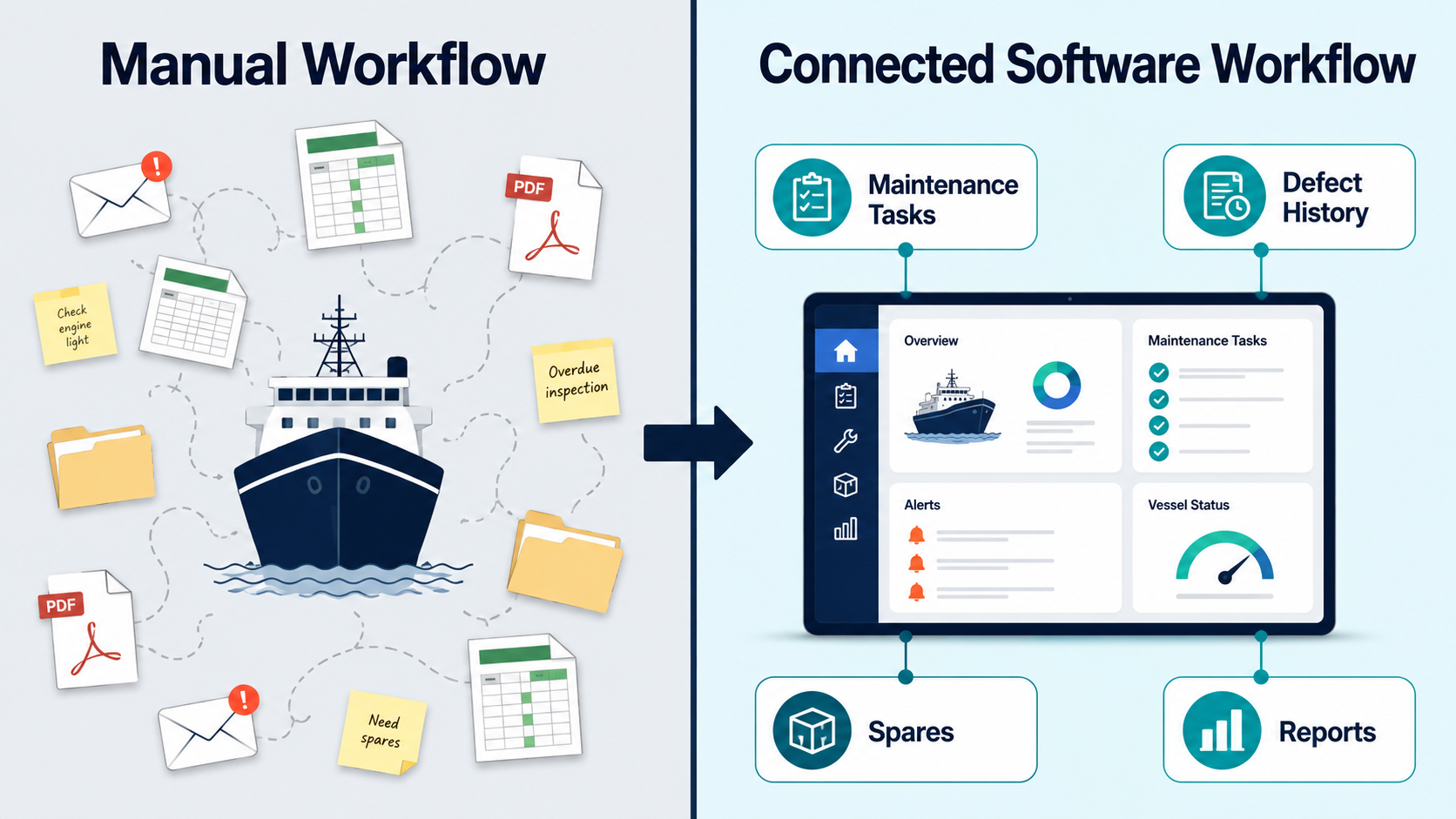
But today, technical teams must manage more information than ever — planned maintenance schedules, running hours, defect reports, spare parts status, service reports, manuals, corrective actions, crew comments, vessel history, and ship-to-shore emails.
When this information is spread across PDFs, spreadsheets, emails, PMS entries, local folders, and personal memory, maintenance becomes slower and more manual. Teams spend time searching, checking, copying, and following up instead of making faster technical decisions.
This is where vessel maintenance software becomes operationally valuable.
Maintenance now affects safety, uptime, inspections, and commercial performance.
The IMO’s ISM Code requires companies to maintain ships and equipment, report issues, take corrective action, and keep records. Allianz Commercial’s Safety and Shipping Review 2025 reported 3,310 shipping incidents in 2024, with machinery damage or failure accounting for 1,860 incidents — the largest category.
Machinery issues can lead to delays, off-hire risk, emergency repairs, spare parts pressure, repeated troubleshooting, inspection findings, and claims documentation challenges.
With rising costs and operational uncertainty, fleets need faster, more connected maintenance workflows. This is why vessel maintenance software is becoming important for improving visibility, efficiency, safety, and decision-making.
Vessel maintenance software is a digital system that helps ship operators plan, track, document, and improve maintenance activities across their fleet.
It usually connects planned maintenance, defect reporting, spares, equipment history, compliance records, and ship-to-shore communication in one workflow.
A good system helps teams manage maintenance schedules, running-hour tasks, defect reports, corrective actions, inspection findings, spare parts requests, and fleet-level dashboards.
In practical terms, it helps answer key questions faster: What maintenance is overdue? Has this fault happened before? Which spare parts were used? What action was taken last time? Which vessels have similar issues?
The strongest systems go beyond task tracking by connecting maintenance work with manuals, defect intelligence, and vessel-specific history.
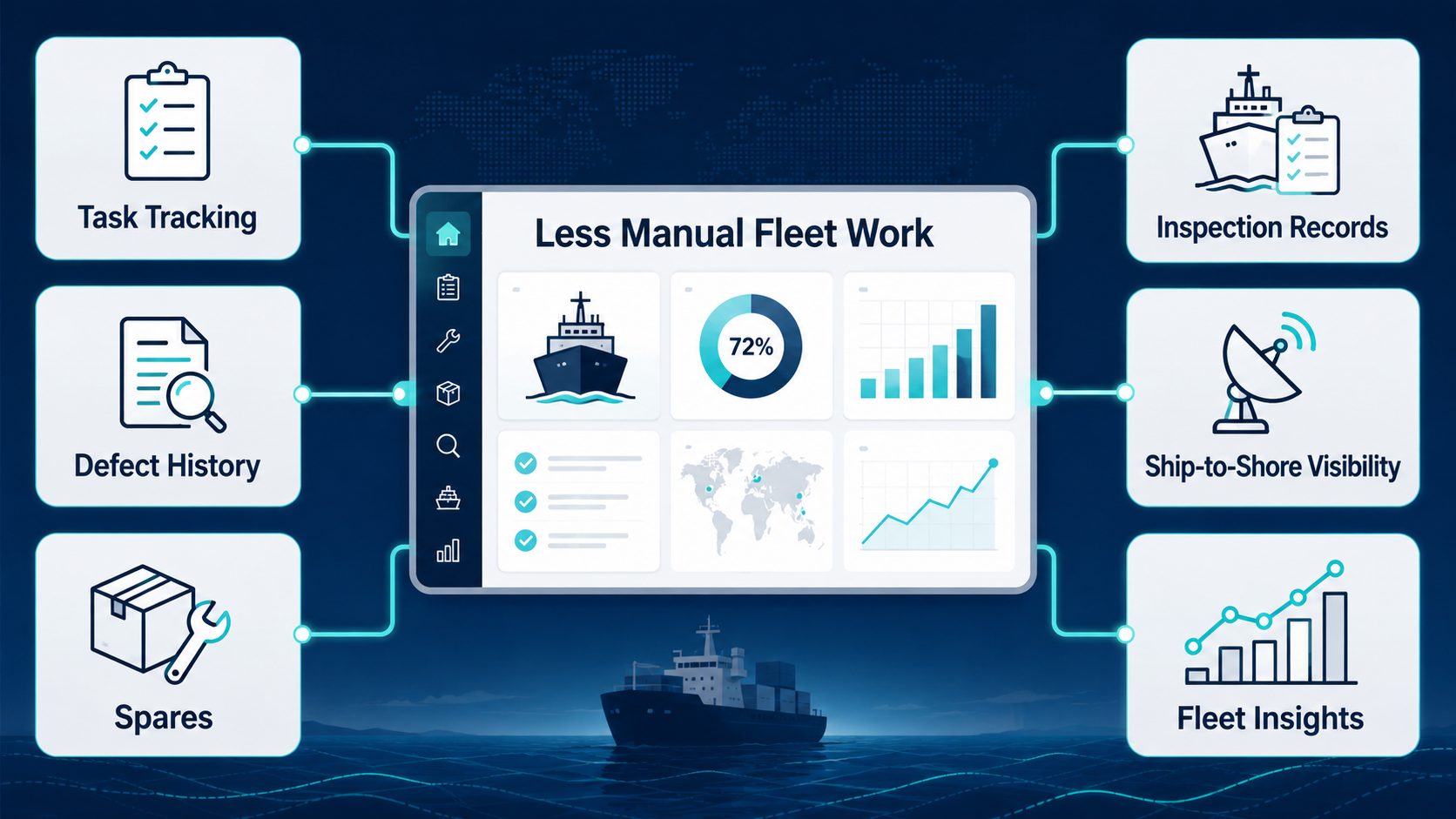
Vessel maintenance software reduces manual fleet work by replacing scattered spreadsheets, emails, reminders, and vessel-by-vessel reports with one structured workflow for planning, tracking, reporting, and follow-up.
In many fleets, maintenance follow-up depends on people remembering what is due, overdue, or pending superintendent review.
Instead of using Excel sheets, email reminders, PMS exports, WhatsApp follow-ups, and monthly reports, vessel maintenance software gives teams a live view of maintenance status. Tasks can be assigned, updated, reviewed, and escalated in one place.
This reduces repeated status checks from the office and helps vessel teams avoid preparing separate reports for every routine update.
When a defect appears, teams often ask, “Did this happen before?”
The answer may be hidden in an old defect report, email thread, handover note, service report, or PDF attachment. Vessel maintenance software reduces this search burden by connecting maintenance history to the vessel, equipment, defect, and corrective action.
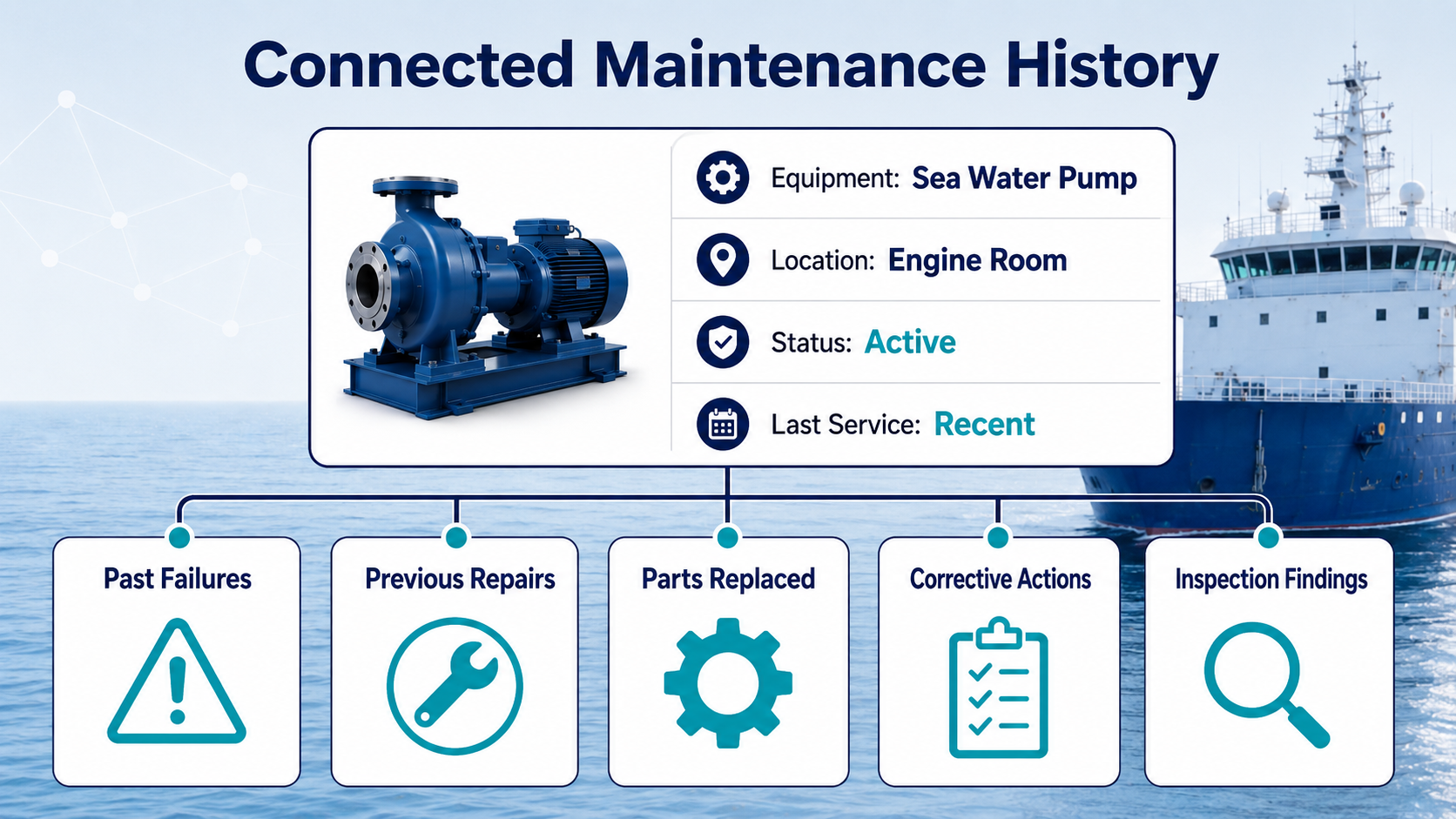
This helps teams quickly review past failures, previous repairs, replaced parts, recurring symptoms, vendor involvement, crew comments, and related inspection findings.
Defect management can become fragmented when issues are raised onboard, clarified by shore, discussed with superintendents, linked to spares, and closed later.
Vessel maintenance software creates a structured defect workflow. Teams can categorize defects, assign responsibility, set priorities, attach photos or documents, and track closure status.
When defect data is captured consistently, fleets can identify repeated failures more easily.
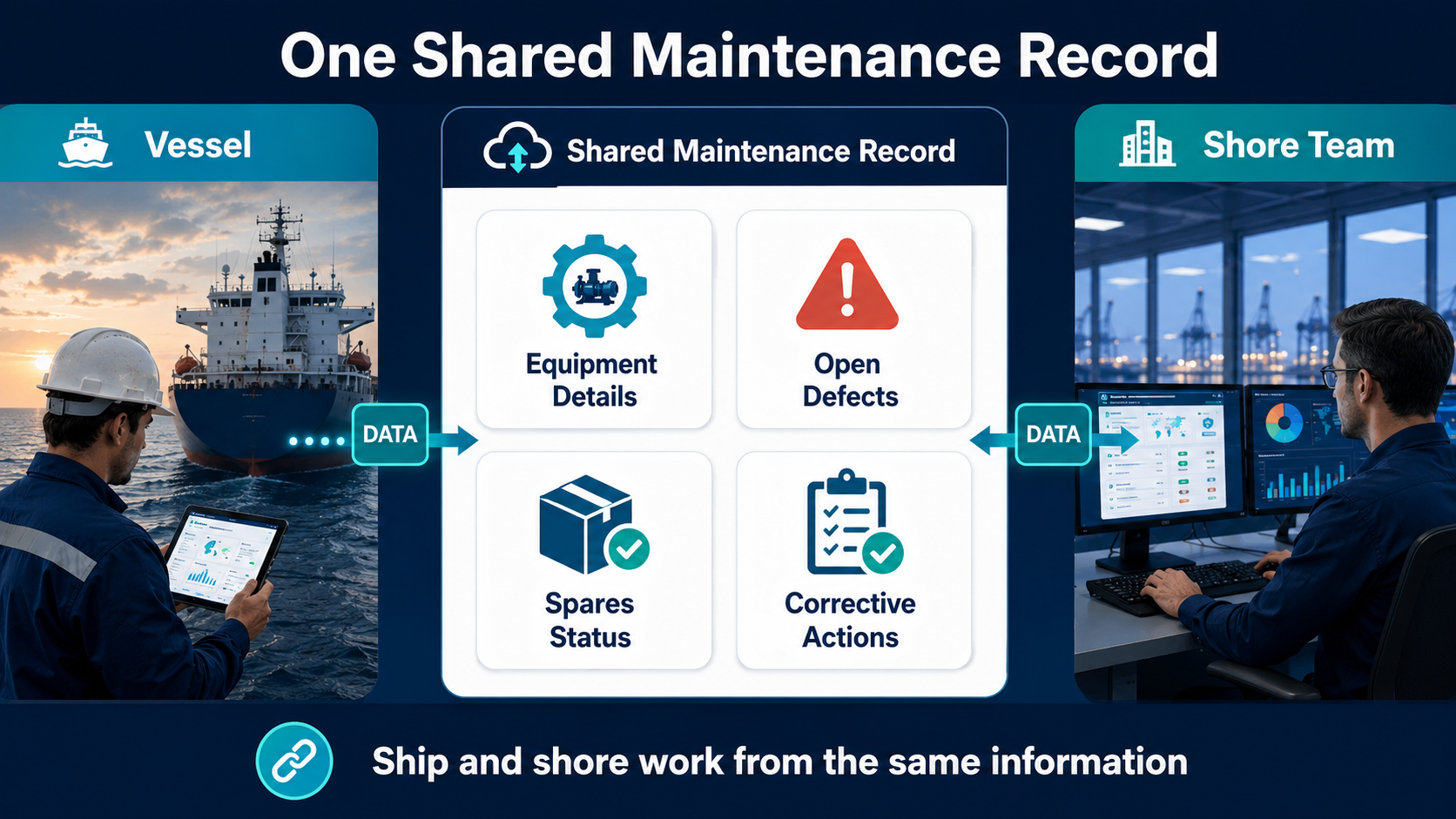
Manual work increases when vessel and shore teams do not see the same information.
A vessel may send a defect update, the office asks for running hours, the superintendent asks for the last service date, and the vessel checks PMS records again. This back-and-forth slows decisions.
Vessel maintenance software improves ship-to-shore visibility by giving both sides access to the same maintenance record, including equipment details, maintenance status, open defects, spares, corrective actions, and supporting documents.
A maintenance plan is useful only when it reflects vessel reality.
Vessel maintenance software helps teams plan around running hours, operating conditions, port calls, spares, crew workload, and defect trends. This helps teams decide which jobs to prioritize, which tasks can wait, which spares should be ordered early, and which recurring issues need superintendent attention.
Maintenance becomes more than a checklist. It becomes a decision-support workflow.
Maintenance delays are often linked to spare parts delays.
Vessel maintenance software connects maintenance jobs and defects with spare parts requirements. This helps teams check stock, verify part numbers, review past usage, and plan procurement earlier.
For fleet operators, this can reduce emergency purchasing, repeated emails, and downtime caused by missing parts.
Maintenance records support class surveys, vetting inspections, audits, and internal reviews.
Instead of collecting evidence from different places, vessel maintenance software keeps job completion records, defect closure evidence, corrective actions, critical equipment checks, and follow-up notes organized.
This helps teams prepare faster and respond more confidently when evidence is requested.
Repeated failures create hidden workloads because teams investigate the same fault again and again.
Vessel maintenance software helps identify patterns such as similar pump failures across sister vessels, repeated alarms after overhaul, recurring valve issues, generator faults, or spare part failures.
Once patterns are visible, fleets can move from reactive repair to preventive improvement and stronger root cause learning.
Manual fleet work usually comes from small workflow gaps repeated every day.
A job may be marked complete in the PMS, while the defect discussion sits in email, spare parts history in another system, and the manual in a PDF folder. Teams then spend time manually connecting the information.
Similar faults may be described differently by different engineers. Without standard wording, it becomes harder to compare issues across vessels and identify recurring problems.
A superintendent may remember a similar issue from last year, but if that knowledge is not captured, the next team may repeat the same investigation.
When evidence is collected only after escalation, teams lose time rebuilding the timeline. Capturing records earlier makes follow-up and reporting easier.
Some fleets use PMS mainly for compliance records. The real value comes when maintenance data supports faster troubleshooting, planning, and technical decisions.
Imagine a vessel reports repeated high temperatures in an auxiliary engine cooling water system.
In a manual workflow, the chief engineer checks manuals, recent maintenance, cooler condition, pump performance, valve positions, and then reports findings to shore. Meanwhile, the superintendent may search old emails to see whether sister vessels had similar issues.
This can take hours or days if records are scattered.
With vessel maintenance software, the team can quickly review recent alarms, last maintenance records, similar defects, spare parts used, OEM manual sections, past corrective actions, and open follow-up items.
When AI-powered troubleshooting is added, relevant previous cases and manual references can be retrieved even faster.
The result is not automatic repair. It is better starting information for engineers and superintendents, especially when the vessel is under commercial pressure.
Not every vessel maintenance software platform is built for the same purpose. Some focus on planned maintenance, while others support spares, compliance, analytics, or AI-powered troubleshooting. Before choosing a system, fleet teams should focus on their real operational needs.
Start with the daily problems, not the software features.
Ask where superintendents lose time, which reports are still manual, which defects need repeated clarification, and which information is hard to find during troubleshooting.
This helps define the actual use case.
Software works best when data is consistent.
Fleet teams should standardize equipment names, fault categories, criticality levels, defect descriptions, closure codes, spare part references, and vessel series mapping.
Without clean data, dashboards and AI outputs become less reliable.
Maintenance records should support troubleshooting, and defect reports should improve future maintenance planning.
A strong workflow connects PMS data, defect history, manuals, OEM guidance, spares, service reports, ship-to-shore discussions, and corrective action records.
If the onboard workflow is difficult, data quality will suffer.
The software should make defect entry simple, support fast search, allow easy attachment upload, reduce duplicate entry, and work well on mobile or tablet devices. Offline and multilingual support can also help where needed.
AI should support marine engineers and superintendents, not replace their judgment.
Fleet teams can use AI to retrieve information, summarize maintenance history, compare similar cases, and highlight relevant checks. Final decisions should still follow vessel conditions, company procedures, and qualified technical review.
Vessel maintenance software can reduce manual fleet work, but only if implementation is done properly.
Important limitations include:
A platform is only as useful as the workflow around it. The goal should be better operational decision-making, not just digital record keeping.
SmartSeas.AI is built around a practical maritime problem: fleet teams often lose time because manuals, defect history, vessel knowledge, and troubleshooting records are scattered.
Smartseas is an actionable intelligence later above the PMS/ Vessel maintenance software
SmartSeas.AI helps bring that knowledge together so technical teams can find answers faster, reduce repeated investigations, and improve ship-to-shore visibility.
For vessel maintenance workflows, SmartSeas.AI supports:
It complements maintenance systems by helping teams make better use of the information already available across the fleet.
Vessel maintenance software reduces manual fleet work by bringing maintenance records, defects, spares, reports, and follow-ups into one searchable workflow.
It helps teams spend less time searching, reporting, checking status, and repeating investigations. It also improves visibility into overdue jobs, open defects, inspection evidence, and recurring machinery issues.
With AI-powered troubleshooting, fleets can connect manuals, defect history, and past fixes faster. SmartSeas.AI supports this by helping maritime teams improve troubleshooting and reduce technical decision delays.
Vessel maintenance software helps ship operators plan, track, and manage maintenance tasks, defects, spares, equipment history, and records across vessels.
It centralizes maintenance data, improves task visibility, tracks defects, links spares with jobs, and reduces repeated ship-to-shore clarification.
A planned maintenance system is usually one part of vessel maintenance software. Broader systems may also include defects, spares, reporting, analytics, compliance records, and AI troubleshooting.
Many fleets still have information spread across PMS tools, emails, spreadsheets, manuals, and local folders. This makes maintenance history harder to find during technical issues.
Yes, it can support downtime reduction by helping teams plan earlier, track defects, coordinate spares, and access past corrective actions faster.
AI helps retrieve manual sections, summarize defect history, compare similar failures, and highlight useful troubleshooting information.
They should look for easy use, defect tracking, equipment history, spares linkage, fleet visibility, reporting, integration readiness, and cybersecurity.
SmartSeas.AI helps fleets connect manuals, defect records, past fixes, and vessel knowledge through AI-powered maritime troubleshooting.

Get Started Today
Transform the way you troubleshoot and manage maritime operations. Join the next wave of Maritime Digital Transformation with SmartSeas AI.




.svg)

.png)